Accepting Assignment for Project Starter Code
- Each student creates a Github account, and shares his/her github username with the CS222P staff on this GitHub Username Sheet.
- Form a team on this Team Signup Sheet, you need to form a team even if you are solo
- Accepts the Assignment from Github Classroom CS222P Project
- Type in the Team ID with this exactly format
team-#where # is your team number on the Team Signup Sheet

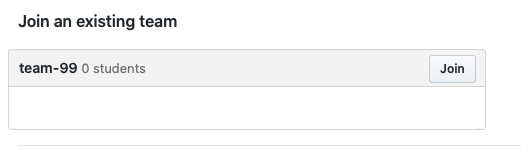
- The second team member (if exists), please select the correct team to join when you accepting the assignment. Note that you cannot change the team after the selection, so please double check.

Initializing Git repo with our codebase:
- Install git following this guidance here.
- then clone the codebase repo:
shell> mkdir my-cs222p-projects
shell> cd my-cs222p-projects
shell> git clone https://github.com/UCI-Chenli-teaching/cs222p-winter20-team-99.git    - Clone the repository that GitHub Classroom just created for you, with the team # changed to yours
Now you will see something like this:
git clone https://github.com/UCI-Chenli-teaching/cs222p-winter20-team-99.git
Cloning into 'cs222p-winter20-team-99'...
remote: Enumerating objects: 29, done.
remote: Counting objects: 100% (29/29), done.
remote: Compressing objects: 100% (29/29), done.
remote: Total 29 (delta 10), reused 0 (delta 0), pack-reused 0
Unpacking objects: 100% (29/29), done.
Now it means your remote "cs222p-winter20-team-99" repository has all the code in our codebase, and it's ready for you and your partner to work on the project based on that now!
Using Git to collaborate on this project:
Suppose the CS222P team 99 contains 2 members (Bob and Alice). We will see how they use Git to collaborate in the CS222P class.
- Bob wants to start on project 1. He creates a new branch from the master branch for this task.
shell> git branch            - This command is used to check which branch you are on and what branches are there in your repository. master should be highlighted as you are on master branch.
shell> git checkout -b bob-feature1            - This command creates a new branch and copies all the code from the previous (i.e. master in our case) branch into the new branch.
shell> mkdir project1
shell> cd project1
shell> echo "#include <iostream> using namespace std; int main() { cout << "Hello, World!"; return 0; }" > hello.cpp
shell> git add hello.cpp
shell> git commit -m "added hello world"            - commits changes locally to the bob-feature1 branch
shell> git push --set-upstream origin bob-feature1            - creates a remote tracking branch for the local bob-feature1 branch
- Alice wants to contribute too. First Bob needs to invite Alice as a contributor to this repository on the Github web site (by following steps given here). Then she can see the repository. She does the following:
shell> mkdir gitclones
shell> cd gitclones
shell> git clone https://<Alice's username>@github.com/UCI-Chenli-teaching/cs222p-winter20-team-99.git             - brings the repository onto her local machine
shell> cd cs222p-winter20-team-99
shell> git checkout bob-feature1             - She is initially on master branch. This statement changes her branch bob-feature1 branch. She can now see project 1 code and does the required changes.
shell> cd project1
MODIFY THE FILE hello.cpp
shell> git add hello.cpp
shell> git status
shell> git config  user.email "alince@alice.com"
shell> git config  user.name "Alice Smith"
shell> git commit -m "minor changes"
shell> git push             - pushes the commit to bob-feature1 remote branch
- Bob wants to continue coding. Before proceeding to modify any files, he needs to do 'git pull' so that the local branch pulls the latest code from the remote branch. In particular, Bob does:
shell> git branch         - to see which branch he is on. He sees he is on bob-feature1 branch.
shell> git pull             - pulls the latest code. Bob now sees the changes that Alice pushed.
- Bob and Alice can also use github to create a pull request from the
bob-feature1branch to themasterbranch to do code reviews. Check this video to learn this process.
Refer to following tutorials for more information:
Last modified
6 years ago
Last modified on Jan 7, 2020, 9:57:14 AM
Attachments (2)
- accept-assignment.png (141.0 KB ) - added by 6 years ago.
- accept-assignment-second-member.png (11.0 KB ) - added by 6 years ago.
Download all attachments as: .zip
Note:
See TracWiki
for help on using the wiki.