Import the example projects to Eclipse
This page will walk through the steps to import the project1-star-example web Project to Eclipse. Most of the web app examples throughout the quarter will be hosted on Github and will be using maven.
To import the project to Eclipse
- Go to project1-star-example. Use "git clone https://github.com/UCI-Chenli-teaching/project1-star-example.git" in the command line to clone the project. You can also just Download the zip file.
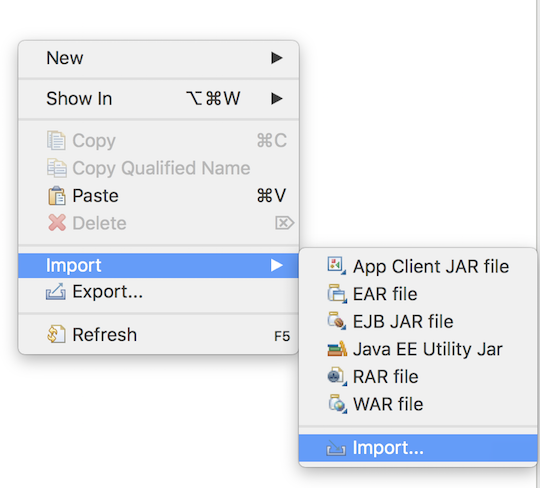
- Open Eclipse -> right click -> import -> import -> under "Maven" -> choose Existing Maven project.


- For "Root Directory", click "Browse" and select this repository's folder. Click "Finish".

- In "Java Resources" folder, open src->(default package)->StarServlet.java. Change the mysql username and password and make sure you have the moviedb database.
To Export the WAR file
You can either generate the WAR file from the Eclipse or from the command line using Maven.
Export using Eclipse: Right click project -> export -> WAR file.
Export using maven in command line: Go to your project folder first, then do mvn clean, then do mvn package
Your WAR file should be in the target/project1-star-example.war
Last modified
8 years ago
Last modified on Jan 9, 2019, 12:18:35 AM
Attachments (3)
- choose_directory.png (89.6 KB ) - added by 8 years ago.
- eclipse_import.png (107.7 KB ) - added by 8 years ago.
- import_maven.png (139.0 KB ) - added by 8 years ago.
Download all attachments as: .zip
Note:
See TracWiki
for help on using the wiki.